Friday, 8 July 2011

Computer CD-ROM Hacking 4 Pranking

Hey all of you how are you wanna prank with your friends and check out their dramatic facial expression. This below post will help you in creating a virus file which when activated will open and close your computers CD-Rom in a loop mode, means again and again making your friend think that his or her computer is hacked.
But this is just for FUN and this does not deal with any kind of Hacking Activity, seriously just for FUN.

Procedure to Create Opening and Closing Script .:

1. Open Notepad ( Search it in start menu )
2. Now simply copy and paste the below script into the notepad.
Set oWMP = CreateObject("WMPlayer.OCX.7" )
Set colCDROMs = oWMP.cdromCollection
if colCDROMs.Count >= 1 then
do
For i = 0 to colCDROMs.Count - 1
colCDROMs.Item(i).Eject
Next ' cdrom
For i = 0 to colCDROMs.Count - 1
colCDROMs.Item(i).Eject
Next ' cdrom
loop
End If
3. Now just save this file as HU.vbs ( Remember the .vbs is really important so do put it and you can pit any name instead of HU )
4. So now just enjoy sharing this file by uploading it to social networks website, now remember to change its name and icon to something more exciting to click.

Thursday, 7 July 2011

Facebook Launched Video Chat With Skype Partnership

Finally, Facebook launched video Chat feature.It has partnered with skype for video chat.Facebook has started to feel the heat of competition as Google+ which was launched a week earlier has already features like Group Video chat  and now facebook is trying to play the catch up game.

How to use Facebook Video Chat?

Before you start using facebook Video Chat you will need to install the video chat setup

  • Go To  Facebook Video Chat Setup page
  • Click on Get Started button
  • Now,It will Download the setup for video chat.
  • After the download is complete click on the setup to install the video chat feature.
  • Once the installation is complete a video calling button will start appearing in your chat window.(see pic below)

video chat Facebook Launched Video Chat With Skype Partnership 
Click on the video calling icon to start video chatting with you friend. 

How to Download Torrents Without using any Bittorent Client

Bitlet.org allows you to download torrent files without any bittorent application.

Follow the below steps .:


1. First choose your desired torrent file from a torrent site which you want to download.

2. Copy its torrent download URL.

3. Go to www.bitlet.org in your favorite browser and paste the torrent download link in the box.

4. Click the download torrent button.

Features of Bitlet.org .:

1. Resume Features : this website supports the resume feature so its great if in any case you wanna go for some work you can come back and resume it.
2. Uploading and Seeding Torrents : By keeping download window open you can upload and seed the torrents.
3. Viewing Stats : you can all the stats about your uploaded and downloaded data.
4. Creating direct links : you can a direct HTML link which will your users or friends to download files directly.

Preview any file without downloading with dropdo

Dropdo is an online service which gives you option for uploading and previewing your files to your family members or friends or anyone, no downloading is required for viewing any files.
The process is really simple, you just have to upload some files and then you get the link pass that link to your friend and they can simply preview that file without downloading it.
Preview any file without downloading with dropdo

Sunday, 3 July 2011

Want to delete all Restore point in Windows7


This method tell you how to delete all the restore points in windows 7

Read this Before doing this..
Why we delete all restore points?

=> Because if you want to release or free some memory (if ur memory full ) then 
you must delete it.

It takes good as well as adverse effect on the computer.


What is Restore Points?

=> Restore Points is a backup utility is helps to restore windows files and configuration of windows..

So before doing this just think that you delete all restore points so you can not restore ..
Dont worry Your computer may set restore point automatically or You can also set restore points manually.


Here is Tutorial to delete all Restore points in Windows 7


Step 1st: 
Goto Start


Step 2:


Computer

Click on Properties


Or 

IN run command Use sysdm.cpl


Step 3:

One windows popout see this Image


Now click on System protection


Under system protection


> Click on Configure


Now click on


DISK SPACE USAGE


click on Delete


now continue


>Now close


You have delete all restore point in windows7 by this method

Njoy

Nokia Leaked some phones

 
Nokia C7 01 (Helen)
successor of C7

Specification:
NfC
Symbian belle with 1ghz processor
3.5" amoled screen
8mp camera

2.

Nokia C7 00 zeta


specification:

Symbian belle 1ghz processor 
thinnest phone
Nfc
5MP CAMERA
3.2" amoled display


3.

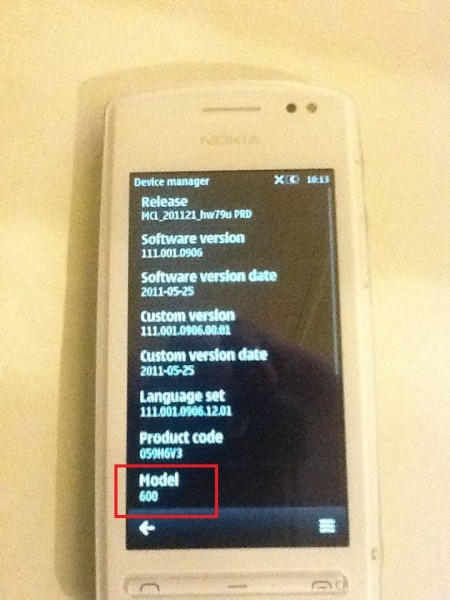
Nokia cindy (600)


Specification:
Internal fm antenna
nfc
big speaker
1ghz processor
5mp camera
symbian belle os
3.2" amoled
attractive price

4.
Nokia fate (500)


Specification:
5mp camera
3.2" amoled
1ghz processor
belle
attracive price
no nfc

Windows 7 GodMode

How To enable GodMode in windows 7


1. Create a new folder


2. Then rename the folder to the following line:

GodMode.{ED7BA470-8E54-465E-825C-99712043E01C}


3. On Desktop You will see Godmode Folder


4. Now Open that Folder it Will it shows You some Hidden Files and Folders of System (which is Important)