Monday, 20 June 2011

Nokia Secret Codes

On the main screen type
*#06# for checking the IMEI (International Mobile Equipment Identity).
*#7780# reset to factory settings.
*#67705646# This will clear the LCD display
*#0000# To view software version.
*3370# This Nokia code activates Enhanced Full Rate Codec (EFR) - Your Nokia cell phone uses the best sound quality but talk time is reduced my approx. 5%
#3370# Deactivate Enhanced Full Rate Codec (EFR)
because phone receives less signal from network.
*#4720# Activate Half Rate Codec - Your phone uses a lower quality sound but you should gain approx 30% more Talk Time
*#4720# With this Nokia code you can deactivate the Half Rate Codec


*#2820# Bluetooth device address.
*#746025625# Sim clock allowed status.
*#62209526# - Display the MAC address of the WLAN adapter. This is available only in the newer devices that supports WLAN like N80
#pw+1234567890+1# Shows if sim have restrictions.


*#92702689# - takes you to a secret menu where you may find some of the information below:
1. Displays Serial Number.
2. Displays the Month and Year of Manufacture
3. Displays (if there) the date where the phone was purchased (MMYY)
4. Displays the date of the last repair - if found (0000)
5. Shows life timer of phone (time passes since last start)

If you forgot wallet code for Nokia S60 phone, use this code reset: *#7370925538#
Note, your data in the wallet will be erased. Phone will ask you the lock code. Default lock code is: 12345

Press *#3925538# to delete the contents and code of wallet.

*#7328748263373738# resets security code.
Default security code is 12345

Unlock service provider: Insert sim, turn phone on and press vol up(arrow keys) for 3 seconds, should say pin code. Press C,then press * message should flash, press * again and 04*pin*pin*pin#

Change closed caller group (settings >security settings>user groups) to 00000 and ure phone will sound the message tone when you are near a radar speed trap. Setting it to 500 will cause your phone 2 set off security alarms at shop exits, gr8 for practical jokes! (works with some of the Nokia phones.)

Press and hold "0" on the main screen to open wap browser.

Samsung secret codes

Samsung - Service Codes
*#06# Show IMEI
*#9999# Show Software Version
*#0837# Show Software Version (instructions)
*#0001# Show Serial Parameters
*#9125# Activates the smiley when charging
*#0523# LCD Contrast
*#9998*228# Battery status
capacity, vol***e, temperature)
*#9998*246# Program status
*#9998*289# Change Alarm Buzzer Frequency
*#9998*324# Debug Screens
*#9998*364# Watchdog
*#9998*377# EEPROM Error Stack - Use side keys to select values


*#9998*427# Trace Watchdog
*#9998*523# Change LCD contrast
*#9998*544# Jig detect
*#9998*636# Memory status
*#9998*746# SIM File Size
*#9998*778# SIM Service Table
*#9998*785# RTK (Run Time Kernel) errors - if ok then phn is reset,
info is put in memory error
*#9998*786# Run, Last UP, Last DOWN
*#9998*837# Software Version
*#9998*842# Test Vibrator - Flash the screenlight during 10 sec
and vibration activated
*#9998*862# Vocoder Reg - Normal, Earphone or Carkit
*#9998*872# Diag
*#9998*947# Reset On Fatal Error
*#9998*999# Last/Chk
*#9998*9266# Yann debug screen (Debug Screens?)
*#9998*9999# Software version
*0001*s*f*t# Changes serial parameters (s=?, f=0.1, t=0.1)
*0002*?# unknown
*0003*?# unknown
FOR NEW SGH (R210, T100, A300...)
if code is in format *#9998*xxx#
try write in this *#0xxx#
SGH-600 SGH-2100
*2767*3855# Full EEPROM Reset (THIS CODE REMMOVES SP-LOCK!
but also changes IMEI to 447967-89-400044-0
*2767*2878# Custom EEPROM Reset
D820
Symbian Parte
**04* change code PIN - can use **04*old_pin*new_pin*new_pin#
**042* change code PIN2
**05* Unblock PIN
**052* Unblock PIN 2
*#7780# Restore factory settings-Need lock code
*#7370# Restore factory setting-Deep mode-Need lock code
*#2820# Show bluetooth MAC adress -Same as *#232337#
*#7370925538# Reset settings value in waller app
*#92702689# Show life time of device
Phone part
*#[IMG][/IMG]4# Show soft version
*#1111# Show FTA S/W version
*#2222# Show FTA H/W version
#9998*8376263# Show S/W version
*2767*2878# Custom reset
*2767*927# WAP reset
*2767*63342# Media reset
*2767*5282# Java reset
*2767*3855# Full reset
*#9998*377# Show error log
*#9998*842# Vibrator test
*#9998*782# Show rel time clock
*#9998*3323# Reset the device
*#9998*289# Buzz test
*#9998*523# LCD contrast test
*#9998*8378# Show debug Monitor
*#9998*2886# Toggle auto answer option
*#3888# Enter bluetooth test mode
*#4357# Show help dialog
*#9998*228# Show battery Information
*#4777*8665# retrive GPRS setting value
*#0*# Enter LCD test mode
*#9998*746# Show SIM information
*#9998*778# Show SST information
*#06# Show IMEI

SGH V200
Unlocking:
Power on the phone without SIM card and type these codes:
*2767*63342# and press green button
*2767*3855# and press green button
*2767*2878# and press green button
*2767*927# and press green button
*2767*7822573738# press button
Phone will be unlocked, but all trims are reseted !!!
Mobile phone must be fully charged

E710/715
*#32436837# DAI ON Digital Audio Interference On
*#3243948# DAI OFF Digital Audio Interference Off
*#9324# MONITOR
*#0746# SSMS MEMORY:20
*#0842# vibra on
*#0289# buzzer on
*#4357# HELP (4357) This screen!!!!!!!
*#7777# verze SW
*#8888# verze HW
*#9999# Revize HW
*#0782# cas provozu, zapnit? a vypnit? - LIVE TIMER
*#0523# 41 (80) menu: 12
*#0638# SIM: f23003 F230 030
*#0778# SST size: 10
*#9273696# Java D/L setting
*#92782# Wap user agent
*#9998*5646# change operator logo at startup
*#9998*76# production number
*#9998*968# view melody for alarm - YAMAHA OK
*#0778# Sim Service table
*#9998*523# or *#9998*0523# or *#0523# Display Contrast
*#9998*288# or *#9998*0288# or *#0288# Battery & Field Infos
*#9998*5282# Java menu (GRPS/CSD settings for JAVA server)

E700/S500 100%..... X100/X600???!!!???
#*566335# Wap model ID
#*5663352# java model
#*5663351# model
#*53696# java download mode
#*536963# serial enabl others disabled
#*536962# HTTP enabl WAPSAR disabled
#*536961# WAPSAR enabl HTTP dis
*663867 MF file dumped
*335 All MMS mes deled
*2767*77667# Spain MMS settings
*2767*78667# Portugal
*2767*65667# Netherland
*2767*29667# Czech
*2767*28667# Austria
*2767*48667# Italy
*2767*37667# France
*2767*85667# Uk
*2767*33667# Germany
*2767*73738927# MMS Reset????

*2767*77927# Spain WAP Setting are applied
*2767*78927# Portugal
*2767*29927# Czech
*2767*65927# Netherlands
*2767*28927# Austria
*2767*37927# France
*2767*48927# Italy
*2767*85927# Uk
*2767*33927# Germany
#7263867# Ram Dump On
#*3232# Current Mode - DCD mode
#*3231# DCD en TRACE dis
#*3230# TRACE en DCD dis
#*6428# MIC measuremnt CMD: Set, DSPMTCV11, MICHDW in cihard. opt
#*6422# MIC dep RXdata CMD: Set, DSPMTCV11, MICHDW in cihard. opt
#*6421# MIC on CMD: Set, DSPMTCV11, MICHDW in cihard. opt
#*6420# MIC off CMD: Set, DSPMTCV11, MICHDW in cihard. opt
*#7465625# Secret Menu
#7465625*28746# ?
*7465625*28746# ?
#7465625*2827# ?
*7465625*2827# ?
#7465625*2877# ?
*7465625*2877# ?
#7465625*28782# ?
*7465625*28782# ?
#7465625*28638# ?
*7465625*28638# ?
#7465625*228# ?
*7465625*228# ?
#7465625*746* ?
*7465625*746* ?
#7465625*27* ?
*7465625*27* ?
#7465625*77* ?
*7465625*77* ?
#7465625*782* ?
*7465625*782* ?
#7465625*638* ?
*7465625*638* ?
*#8377466# SW + HW info
*#8888# HW info
*#9999# SW info
*#8999*8376263# komplet info
*#8999*636# IPD info
#*2677# ARM state: None
#*0000# ??????
*#8999*324# Net monitor??
#*6200#
#*6700#
#*6900#
#*7200# neplatn? ?roven pr?stupu
#*6100# command #*6100# Executed
*2767*3700# SGH-E700 BSI
*2767*7100# SGH-S100
*2767*8200# SGH-V200
*2767*7300# SGH-S300
#0111*codigo#
*2767*637#
*2767*688#
*2767*wap#
*2767*media#
*2767*mms#
*2767*226372# Camera Reset
*2767*688# MEP off
*2767*927# WAP
*2767*2878# E2P Custom reset
*2767*3855# E2P Full reset
*2767*2878# Sec reset
#*7828# C??? Midi Ri51
#*5111# PI 0813 33 99 MSI 7 NA 0 18 P99 T00 CffHff
#*2562# nejakej reset
#*2565# no blocking General Defense
#*3353# General defense Code Erased
#*3837# reset ???????
#*3849# reset ???????
#*3851# reset ???????
#*3876# reset ???????
#*7337# reset ???????
#*5376# reset All SMS Deleted
#*7222# Operation Typ: Class C GSM
#*7224# Error!!!!
#*7252# Operation Typ: Class B GSM
#*7271# multi Slot Class 1 GPRS
#*7274# multi Slot Class 4 GPRS

#*2787# CRTP on - Batery options
#*3737# L1 AFC DeltaF -36 NbAfcCorr 0 AdjustFoi 0 CumFoi 0
#*3825# Command #*3825# Executed
#*5133# L1 HO Data Async HO 83 Sync HO 0 HO Fail 0 TCH 40
#*7288# GPRS Detached
#*7287# GPRS Detached
#*7666# SrCell data RAC 255 NMO 255
#*7693# Sleep Deact
#*7284# Class B
#*2256# Calibr - info
#*2286# DATAbattery
#*2527# GPRS switching set to class 4
#*2679# Copycat feat. Activated
#*3940# External looptest 9600bps not avalible in SYSOL2!
#*4263# handsfree mode Activated
#*4700# Half rate deact
#*7352# BVMC Reg vaule Set BMVC to 00H For Cmd set DEBUGBATTERY in cihard.opt
#*8462# Sleeptime sinc SwitchOf
#*2558# Time ON For Cmd set DEBUGBATTERY in cihard.opt
#*3370# EFR Deact
#*3941# External looptest 115200bps not avalible in SYSOL2!
#*5176 L1 Sleep TOI N:5 TOI P:0
#*7462# SIM phase 3
#*7983# Vol***e/Freg Deact
#*7986# Vol***e Activated
#*8466# Old time
#*2255# Call failed mode: Command not Implemented
#*5187# L1C2G trace Activated
#*6837# Official SW version: 120107A1
#*7524# KCGPRS: +data
#*7562# LOCI GPRS: +data
#*7638# RLC allwazs open ended TBF Actiated
#*7632# Sleep mode Debug: +data
#*7673# Sleep mode RESET
#*2337# Permanent Registrtion Beep: NOT YET IMPLEMENTED
#*2474# For Cmd set DEBUGBATTERY in cihard.opt
#*2834# Audio Pth Mobile Normal
#*3270# DCS support Deact
#*3282# Data Deact
#*3476# EGSM Deact
#*3676# falh volume formated
#*4674# IMSI: +data
#*4760# GSM Activated
#*4864 pro tento model nic
#*5171 data
#*5172 data
#*5173 data
#*7326# Accessorz: vibrator
#*7676# Command #*7676# Executed
#*7683# Sleep variable
#*7762# SMS Bearer CS Activated
#*7957# Command #*7957# Executed
#*8465# Time in L1 +data
#*9278# Command #*9278# Executed
#*9795# WTLS key Reset
#*2252# Current call: +data
#*2836# AVDDSS Managment Deact.
#*3877# Dump of SPY trace: +data
#*7728# RSAV done

Update Strangers Status in Facebook


Facebook is the one and all social networking service which people all over the world use to communicate with all their friends and family members, they share happiness and everything with all their homies so what if you have the power to Update anyone's Facebook status and have some FUN with him.
Now this post is just for educational purpose you should attempt this on any innocent as this would be a serious crime.
Update Strangers Status in FacebookFollow the below steps to Update Status inFacebook .:
1. The trick we are going to use here is from the post : Sending Fake SMS
2. you need to know how to send fake sms so check the above post and then follow the below steps .:
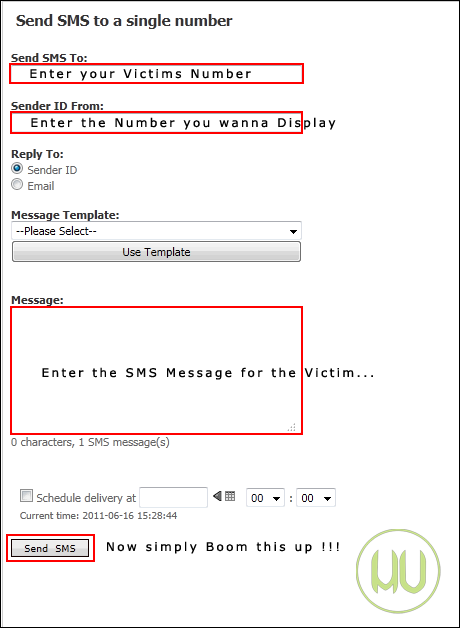
3. Now you know about the SMSGLOBAL from the above post just open the send SMS to number from SMSGLOBAL Dashboard like Below and put .:
+919232232665 in the Send SMS To Field
and
+91xxxxxxxxx in the Sender id From field ( this is your victims number )
4. This trick only works if victim has registered his mobile number to get notifications from Facebook so to get the victims number if he is your friend just go to the info tab on his profile and get the number from the mobile number section.
5. Now add this number to the Sender id From field.
6. Now head over to message adding field and type the funny message you want victims current status to be.
7. After adding the message just check all the fields should be right and make sure you have added +91 before both the numbers above now just click the Blast !!!Button oh I mean Send Button and see the magic.
8. Now go to Facebook.com and check your victims current status , now you know what to do just comment and Like his status to encourage him.

Guide to Untether Jailbreak iOS 4.3,4.3.1 With Redsn0w


A new version of Redsn0w is released by iPhone Dev Team which aims atjailbreaking iPhone on 4.3,4.3.1 with Untether capabilities.

Devices Compatible .:
iPhone 4, iPhone 3GS, iPod Touch 4G, 3G, iPad 1 & Apple TV 2 (Black), not for iPad 2 users.

Requirements .:
Instructions .:
  1. Create a folder on your Desktop and place all required files you downloaded earlier.
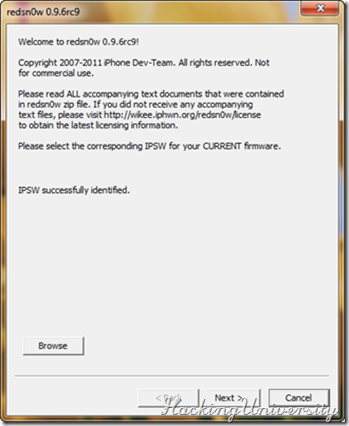
  2. Launch RedSn0w and select the file .ipsw firmware 4.3, 4.3.1 by clicking the browse button, and after that the program will identify the firmware and start a quick process (requires Internet connection).4.3.1 iPhone Jailbreak
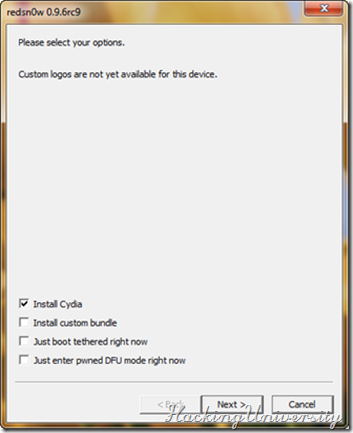
  3. Select  “Install Cydia” and then click again on Next (you can also choose whether to install the custom logos or less).4.3.1 iPhone Jailbreak
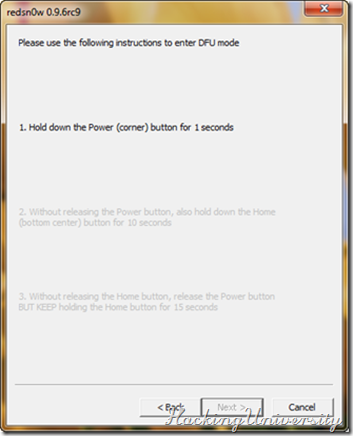
  4. Now turn off your iPhone but make sure it is still plugged in to USB port. If you satisfies this term then click next to proceed, next step is to put your iPhone in DFU mode.4.3.1 iPhone Jailbreak           
  5. To put your iPhone in to DFU mode follow the onscreen instructions, as follows Hold the Power button for 3 seconds, Hold the Home and Power buttons for 10 seconds, then release the Power button and continuing holding the Home button until your iPhone is in DFU mode.
  6. If every thing goes well and you successfully put your iPhone in DFU mode, then the following screen will appear otherwise you will be prompted to do from Step Four.
  7. That’s it after 5 to 8 minute of process you will get your hands on a JailbreakiDevice.

Send Fake SMS With Others Mobile Number


Fake sms is a fun way to prank out with your dearest friends. Well this should only be used for a limited access to play with your Homies but some can take advantage of this technique and f*** everything up by pranking and making problems for others.
With this trick you would be able to send Fake SMS from anyone's number, Yes that’s right you can put your friends enemy number and send him a message. You can do anything but remember this is just for educational purpose any illegal attempt can be taken as a serious crime.
Procedure for sending fake sms .:
1. Go to SMSGLOBAL
2. Now simply click the New User button below Login Credentials.
How to Send Fake SMS
3. After successful sign up you will see the confirmation that code has been sent to your phone.
4. Now simply grab your registered mobile number and go to SMSGLOBAL.COM and put your Username and your Password which you received on your mobile number.
How to Send Fake SMS


5. Now the above windows will just open in front of you simply click on Send SMS to Number.
6. Now you will be presented with this layout just enter the information as said in the image below.
How to Send Fake SMS
7. That’s all you had successful a fake prank with your dearest friend so have fun with this service but don’t make anyone cry with this service.
Remember: you just have 25 sms credits if they are over then you need another mobile number to get more sms for free. So use these free credits wisely.


DISCLAIMER .: The post is for educational purposes only ! “WE" is not responsible for any kind of loss or damage. Its is considered as illegal, Do this @ ur own risk.

Sunday, 19 June 2011

Hide Your Files In a JPEG | Lock Files in JPEG Format

Well, did you know you could hide your files in a JPEG file? For this, you will only need to download WinRAR. You just need to have a little knowledge about Command Prompt and have WinRAR installed.

Ok, lets begin…

1. Gather all the files that you wish to hide in a folder anywhere in your PC (make it in C:\hidden - RECOMMENDED).

2. Now, add those files in a RAR archive (e.g. secret.rar). This file should also be in the same directory (C:\hidden).

3. Now, look for a simple JPEG picture file (e.g. logo.jpg). Copy/Paste that file also in C:\hidden.

4. Now, open Command Prompt (Go to Run and type ‘cmd‘). Make your working directory C:\hidden.

5. Now type: “COPY /b logo.jpg + secret.rar output.jpg” (without quotes) - Now, logo.jpg is the picture you want to show, secret.rar is the file to be hidden, and output.jpg is the file which contains both. :D

6. Now, after you have done this, you will see a file output.jpg in C:\hidden. Open it (double-click) and it will show the picture you wanted to show. Now try opening the same file with WinRAR, it will show the hidden archive .

Saturday, 18 June 2011

How to disable”Turn Off Computer”button in XP?


Image Hosted by ImageShack.us
Today tip is very useful particularly for those users who want to restrict the common users to shutdown public computer in common areas. You can disable the “Turn off Computer” button on the start menu and a common user will not “Turn Off, Restart and Stand By” a computer. Using registry editor, you can implement this task in all windows XP versions with minimum effort.
Follow the given steps to disable Turn off Computer” button on the start menu:
To use this feature, you will need to be logged into your computer with administrative rights.
Click Start button and type regedit in Run option then press Enter for next.
Image Hosted by ImageShack.us
Here locate the location to:
HKEY_CURRENT_USER\Software\Microsoft\Windows\Curre ntVersion\Policies\Explorer
Here in right side panel, right click to create a new DWORD value with the name NoClose.

Now assign number 1 in value data box and close the registry editor.
Image Hosted by ImageShack.us
Now close the registry editor and restart your computer after any changes to go into effect.
But next time, if you want to enable “Turn Off Computer” button on start menu then simply change the value of data box to 0 or delete NoClose DWORD item.